

In under five minutes, you can configure Xubuntu Linux for typing Greek, including diacritical marks (accents and breathing marks).
Step 4 is the only portion of this tutorial that is Xubuntu-specific. For other flavors of Ubuntu, or for other Linux distros, you may need to modify that step slightly depending upon which system application you use for setting the keyboard layout.
Typing in Foreign Languages:
1. Download a TrueType Greek Font
For example, the Society of Biblical Literature provides a free copy of the SBL Greek Font here. If you choose a different font, be sure that it follows the Unicode conventions for mapping foreign language characters.
2. Copy the .TTF file into the Font Folder
You will need administrative privileges (i.e., the sudo command) to do so. In terminal, type:
sudo cp ~/Downloads/*.ttf /usr/share/fonts/truetype
3. Reset the Font Cache
This step ensures that your system takes notice of the new font. In terminal, type:
sudo fc-cache -f
4. Configure the Keyboard Layout
Go to Settings Manager [or a similar system tool, depending upon your Linux distro] >> Keyboard > Layout and at:
- Change Layout Option: select Both Shift Keys
- + Add: select Greek Polytechnic
5. Type Greek Letters and Diacriticals
Load your favorite word processor, such as LibreOffice Writer. Select the Greek font you have installed and start typing. At first, it will all appear in the English alphabet. Now, press down both the left and the right SHIFT keys simultaneously. Type again, and you’ll see Greek. Press both SHIFT keys simultaneously once more to switch back to English typing. (By repeating Step 4, you can configure a different key combination, but SHIFT-SHIFT seems to be both convenient and also different enough from most other ALT- or CTRL- commands that you use for other purposes so that you won’t mistype one for the other.)
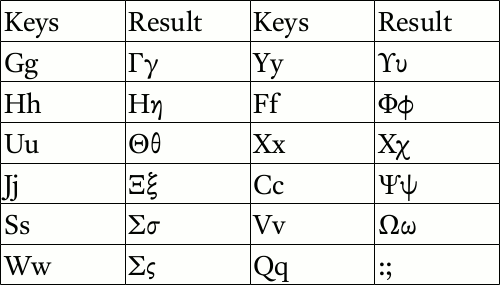
Most keys produce the Greek letter that one would intuitively expect: A becomes alpha, B become beta, and so on. The following chart lists those letters that may take some practice to learn.
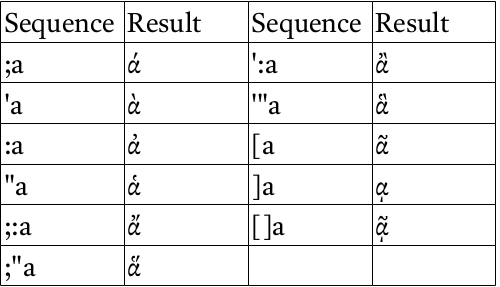
To produce diacritical marks (that is, accents and breathing marks), two or three key must be entered sequentially. After the last key (the vowel) has been pressed, the result will appear as shown in the following chart.
One final note: while in Greek entry mode, some shortcut keys for accessing menus, etc., may not work. Simply press the right and left SHIFT keys simultaneously to return to English entry mode and you once again will find those other keyboard shortcuts working.
Dr. Ryan MacPherson holds a PhD in history and philosophy of science from the University of Notre Dame. After serving for twenty years as a professor at Bethany Lutheran College, he served as the founding academic dean of Luther Classical College for three years. He is author of Rediscovering the American Republic, a two-volume anthology of primary sources in American history, as well as several other books on topics ranging from theology to politics to bioethics. Dr. MacPherson has testified in court in defense of a homeschool father and for the protection of traditional American civics curricula, contributed to legal briefs submitted to the U.S. Supreme Court in defense of marriage and the rule of law, appeared regularly on a variety of radio shows, and taught seminars for pastors and educators in Canada, Denmark, and Ecuador. The MacPherson homeschool family offers online enrichment courses through Lifelong Lyceum.
